
One small phone setting can make your ferry crossing much more expensive than expected. On international ferries, longer island routes and cruise-style crossings, your phone may switch from a normal land-based mobile network to a maritime or satellite network, and data on those networks can be surprisingly expensive.
Quick answer: before your ferry leaves port, switch on flight mode, also called airplane mode, and then manually turn Wi-Fi back on if you want to use the ferry’s onboard Wi-Fi. Do not leave mobile data and roaming active at sea unless you are sure your provider includes maritime, satellite or cruise networks.
This can happen on routes in Europe, the Mediterranean, the Caribbean, between Spain and Morocco, on US–Mexico sailings and on longer crossings where the ship moves away from land-based mobile coverage. The route itself is not always the problem. The problem starts when your phone quietly connects to a maritime or satellite network at sea instead of a normal mobile network on land.
We have now had this happen twice ourselves on ferry crossings. Both times it was not because we were streaming films or using loads of data. It was simply because data roaming was still switched on after travelling abroad, and the phone used data in the background while we were on board.
The most annoying example was on a ferry between England and the Netherlands. We had just returned from Seoul and Thailand, where we had used an eSIM (example) quite cleverly and cheaply. For that eSIM, data roaming had to be switched on. Once we were back on the ferry to the Netherlands, we simply forgot to switch it off again.
Why mobile data at sea can be so expensive
On land, roaming is often fairly predictable. Your mobile bundle may include certain countries, or at least show clear rates before you travel. On a ferry, however, that can change once the ship is away from the coast.
When there is no normal mobile signal from land, some ferries and cruise ships use an offshore maritime network or satellite-based mobile service. If roaming is enabled, your phone may connect automatically. These networks are often charged separately and may not be included in your normal roaming bundle, even if the crossing is between countries where roaming is usually affordable.
That is where the bill can suddenly become painful. ECC Netherlands warns that mobile data at sea can cost roughly €7 to €10 per MB. In the US cruise market, AT&T lists pay-per-use cruise ship data at $2.05 per MB. Different providers use different rates, but the lesson is the same: at sea, even a small amount of mobile data can become expensive.
Real examples: a few MB can be enough
You do not need to watch Netflix, upload videos or scroll for hours. A few megabytes can be enough, especially if your phone is syncing in the background.
- UK to the Netherlands: one traveller on Reddit reported being charged £33.33 after using just 6.7 MB of data on the Harwich to Hook of Holland ferry.
- Spain to Morocco: on routes such as Algeciras to Tangier, Tarifa to Tangier or Almería to Nador, your phone may catch land-based networks for part of the trip. But if it switches to a maritime network, 10 MB at €7.50 per MB would already be around €75.
- Spain to Italy: on longer routes such as Barcelona to Civitavecchia, Barcelona to Sardinia or crossings towards Sicily, you spend more time away from land-based mobile networks. If your phone quietly uses 20 MB at €7.50 to €10 per MB, that could mean roughly €150 to €200.
- US, Mexico and the Caribbean: some US phone plans include Mexico or Canada roaming on land, but that is not the same as maritime or cruise roaming at sea. At $2.05 per MB, 10 MB would already cost $20.50, and 50 MB would be over $100 if you are not using the right cruise or maritime package.
The frustrating thing is that 10 or 20 MB does not feel like much anymore. Your phone can use that through email, WhatsApp, app refresh, cloud photo backup, map loading or simply opening a news app without thinking.
Onboard Wi-Fi does not automatically protect you
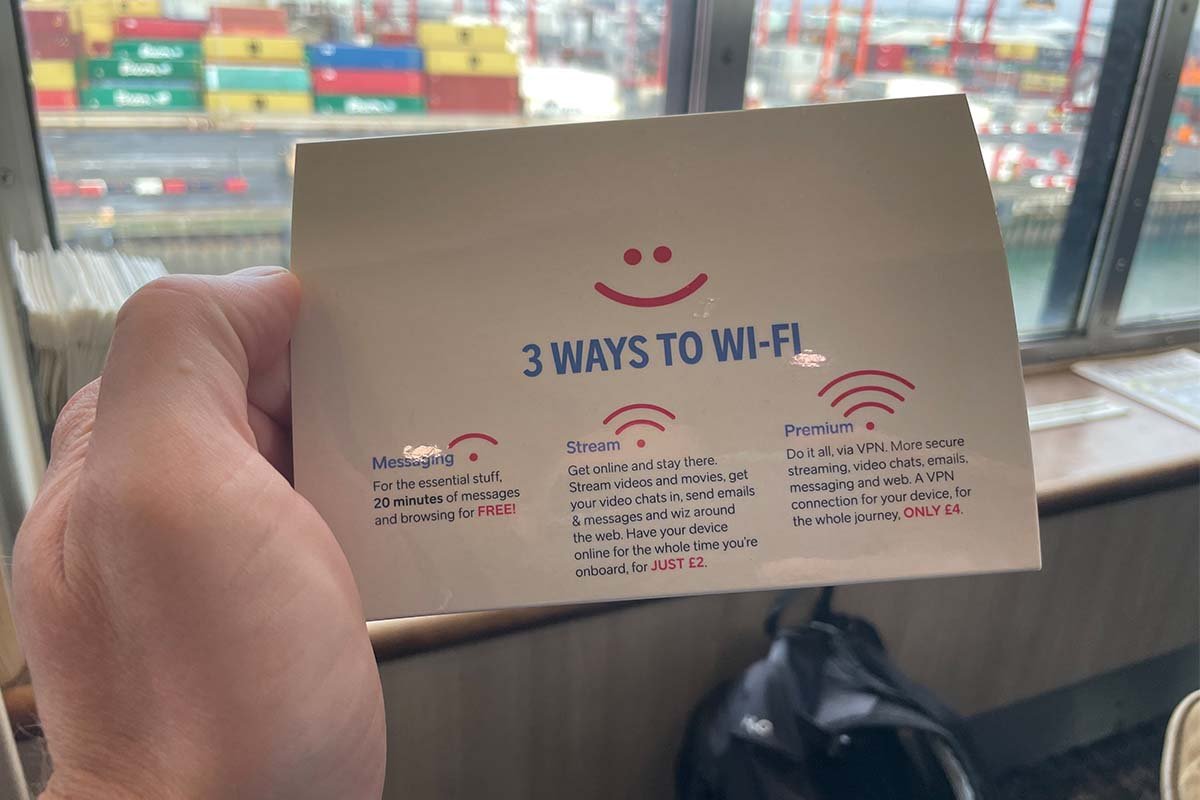
Many larger ferries and almost all cruise ships now offer Wi-Fi. That is usually the better and more predictable option if you need internet at sea. But connecting to onboard Wi-Fi does not automatically switch off mobile data.
This is the trap. You may think you are using the ferry’s Wi-Fi, but if mobile data and roaming are still active, your phone can also connect to an onboard maritime or satellite network in the background. The safer method is simple: switch on flight mode first, then manually turn Wi-Fi back on and connect only to the official onboard Wi-Fi network.
How to avoid maritime roaming charges
Treat a ferry crossing like a flight for your phone settings. Do this before the ship leaves port, not once you are already at sea.
- Switch off data roaming before boarding. This is especially important after using an eSIM abroad.
- Use flight mode at sea. Then switch Wi-Fi back on manually if you want to use the ferry’s own Wi-Fi.
- Do not rely on EU roaming or travel bundles alone. Maritime, satellite and cruise networks are often treated differently from normal land-based networks.
- Check the network name. Be careful with unfamiliar names linked to maritime, satellite, Cellular at Sea, Telenor Maritime, Tampnet or Wireless Maritime Services.
- Set a spending cap with your provider. A low cap can stop a small mistake turning into a very large bill.
- Disable background data and cloud backups. Photo uploads, app updates, email syncing and app refresh are easy to forget.
Download before you sail
For entertainment, the best ferry tip is still the boring one: download everything before you leave. Films, series, podcasts, playlists, audiobooks and offline maps are much better prepared at home, in your hotel or in the port.
This is especially useful if you are travelling with children. Ferry Wi-Fi can be fine for a few messages, but it is not something we would rely on for keeping everyone entertained during a long crossing.
Our FerryGoGo tip
Add ‘data roaming off’ to your ferry checklist. Tickets, passports, car keys, snacks, chargers, and roaming off.
A ferry crossing should be a relaxed part of the trip. Walk around, have a coffee, watch the coast disappear and give your phone a break. Just make sure it is not quietly spending money in your pocket while you do.